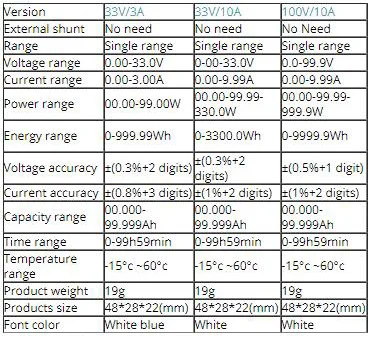
Voltage measurement range: DC00.0-99.9V(100V/10A version ) 0.00-33.00V(33V/10A version)
Power measurement range: 0-99.99W-999.9W(100V/10A version ) 0-99.99W-330.0W(33V/10A version)
Current measurement range: DC0.00-9.99A
Time measurement range: 0-99h59min
Temperature measurement range: -15 °c ~60°c
Capacity accumulation range: 00.000-99.999Ah
Energy accumulation range: 0-9999.9Wh (100V/10A version) 0-3300.00Wh (33V/10A version)
Voltage measurement accuracy:± (0.5% + 1digit)(100V/10A version) ± (0.3% + 2digits)(33V/10A version)
Current measurement accuracy:± (1% + 2 digits)
Font color: Blue/White
Product weight: 18.5g
Product size: 48mm*29mm*22mm (L*W*H)
Display Interface Instruction:

 Run time
 Power display
  Data set
  Temperature display
 Capacity display
 Voltage display
  Current display
  Energy display
Button Function Instruction:
In the display interface, click the button to switch data set; keep pressing button to clear the accumulated data to zero.
The component aging and temperature variation after long-term use may appear tiny error when it measures small current. To avoid this error, you can unplug the current wire socket and keep pressing the button to connect power supply, until the screen display “AAA”, then loose button.
The Wiring Diagram Instruction:
Please ensure proper wiring in strict accordance with the wiring diagram.
Using Isolated Power Supply to power the meter
The two power supplies must be isolated and don’t connect any load. The highest voltage of isolated power supply is 20V

Using DC-DC converter to power the meter
The black thin wire connects nothing and you should use insulator wrap it to avoid short circuit. The DC-DC converter must be common cathode structure.

Using system to power the meter
The black thin wire connects nothing and you should use insulator wrap it to avoid short circuit.